
Documentation
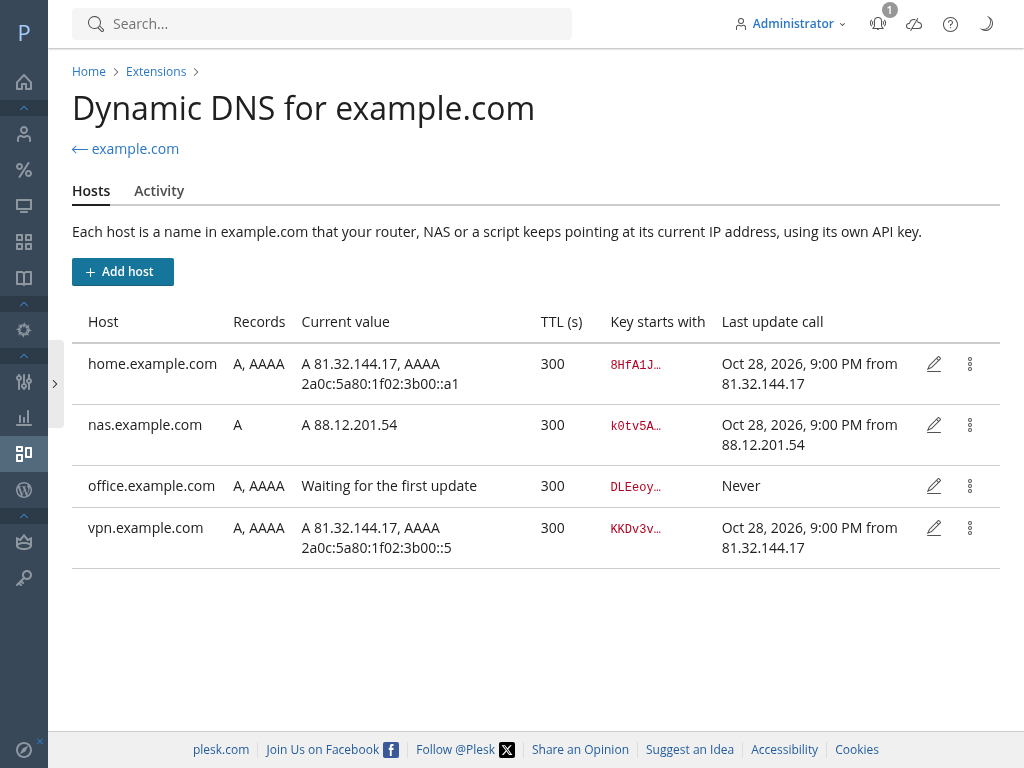
Dynamic DNS on the domains a Plesk server manages. A host (home.example.com) gets an API key,
and a router, NAS or script updates it with one HTTP call, using the dyndns2 protocol or a JSON API.
Concepts
- Host: a fully qualified name inside a domain's DNS zone, created from the "Dynamic DNS" button in
the domain's Hosting & DNS tab. Two kinds:
- address host: follows an IPv4 address (A record), an IPv6 address (AAAA record) or both;
- TXT host: holds one value sent by the client (up to 255 bytes, no quotes or control
characters), for example
_acme-challenge.home.example.comfor ACME DNS-01. Several TXT hosts may share a name, each with its own key (a certificate forexample.comand*.example.comneeds two challenge values at the same time).
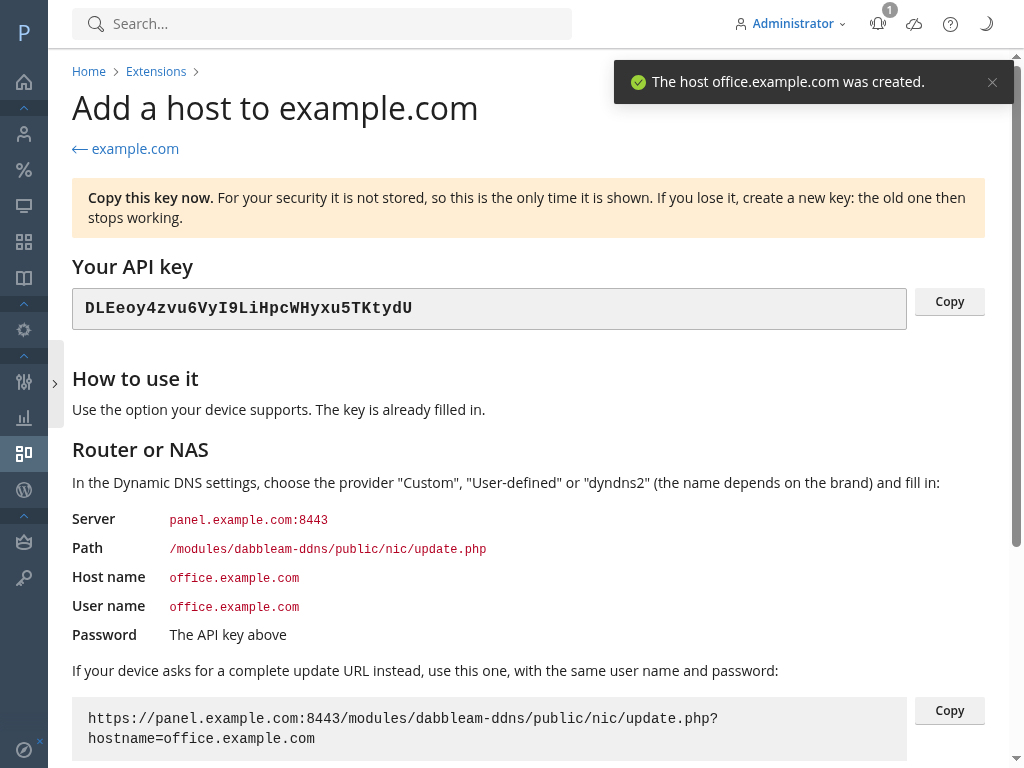
- Key: each host has one random key (16-64 letters and digits, 32 by default). It is shown once, when the host is created or the key is regenerated; the extension stores only its SHA-256 hash and the first 6 characters to recognise it.
- The DNS records live in the Plesk zone as normal records. The extension creates each record on the first update of its type, and rewrites it only when the value or the TTL changes.
- Who can manage hosts: the administrator always; resellers and customers on domains they have access to, when all of these allow it: the plan's DNS management permission, the extension's own permission ("Dynamic DNS"), and the administrator's global setting of who may use the extension (everyone with the permission, the default; administrator and resellers; or administrator only). For a customer, both permissions are those of the subscription (its service plan or its own customization); for a reseller, those of the reseller account (Resellers > (reseller) > Permissions, or its reseller plan), as with every Plesk permission. The "Dynamic DNS" permission is off by default in service plans and subscriptions.
- A suspended subscription keeps its hosts updating (its zone is still served), but its owner cannot open the extension until it is reactivated.
Requirements
- Plesk Obsidian 18.0.53 or later on Linux (panel PHP 8.2+).
- The domain's DNS zone managed by Plesk, and its nameservers serving that zone (the Plesk DNS server, or secondaries fed from it). Otherwise the records change in Plesk but nobody sees them.
- Secondary nameservers and busy zones. Every update is a zone change. With Plesk's default SOA
serial format, YYYYMMDDNN, Plesk raises the serial at most 99 times per zone and day; after that the
Plesk DNS server still serves the new records, but secondaries are not notified until the next day
(Plesk logs "The limit on serial number changes was reached"). If you use secondaries and a zone may
change more often (several hosts, frequent IP changes, many ACME renewals), use the "timestamp"
serial format (
plesk bin server_dns --update-soa -soa-serial-format timestamp). Switching on a server that already has zones makes their serials smaller, so secondaries need their copies reset. The extension shows the administrator a warning on the About tab when a domain passes 80 changes in a day with the YYYYMMDDNN format.
Installation
There are two packages, with the same extension id (installing one over the other keeps all data):
- Free edition: public, at https://dabbleam.com/dynamic-dns. Up to 3 hosts, no Pro features and no licence upload.
- Paid edition (Normal, Pro, Hosting): only from the Dabbleam client area, generated for your licence (each copy carries its mark).
Upload it in Extensions > My Extensions > Upload Extension, or from the command line:
plesk bin extension -i dabbleam-ddns.zip
After installing:
- Open Extensions > My Extensions > Dynamic DNS as administrator and review the settings, above all the public URL (next section).
- To let resellers and customers use it, turn on Dynamic DNS in Service Plans > (plan) > Permissions (or in a subscription's permissions). The plan also needs DNS management.
Reaching the endpoints: ports, public URL and proxies
The endpoints are public scripts of the extension, served by the Plesk panel without a login:
| Endpoint | Path |
|---|---|
| dyndns2 | /modules/dabbleam-ddns/public/nic/update.php |
| JSON API | /modules/dabbleam-ddns/public/api.php |
So by default they live on the panel port: https://panel.example.com:8443/modules/dabbleam-ddns/public/....
The endpoints only accept HTTPS: over plain HTTP (for example the panel's port 8880) they answer
403 (JSON) or badagent (dyndns2), because the key travels in every call. Behind a reverse proxy
that ends TLS itself, list the proxy under Trusted proxies and make it send
X-Forwarded-Proto: https.
Many providers close 8443 to the internet, and many routers can only talk to port 443, or only to
the path /nic/update. There are three ways out:
- Open the panel port to the clients that need it. Nothing else to do.
- Publish the endpoints through a website on port 443 with a reverse proxy (below).
- A proxy you already run (load balancer, CDN) in front of the panel, forwarding the same paths.
In cases 2 and 3, set two administrator settings:
- Public URL:
scheme://host[:port]that clients use, without a path (for examplehttps://ddns.example.com). The panel builds the endpoint URLs it shows to users from it. Empty: the address the panel itself is being used on. - Trusted proxies: addresses or CIDR ranges of your proxies. Only for requests coming from
them is
X-Forwarded-Forbelieved, so the published address is the client's and not the proxy's. Without it, every host would get the proxy's address.
Reverse proxy on a Plesk website (example)
Pick (or create) a domain with a valid certificate, for example ddns.example.com, and add to
Apache & nginx Settings > Additional nginx directives:
# Dynamic DNS endpoints, under the same paths the panel uses.
location /modules/dabbleam-ddns/public/ {
    proxy_pass https://127.0.0.1:8443;
    proxy_set_header X-Forwarded-For $remote_addr;
}

# Optional: the classic dyndns2 path, for clients that only take a server name.
location = /nic/update {
    proxy_pass https://127.0.0.1:8443/modules/dabbleam-ddns/public/nic/update.php;
    proxy_set_header X-Forwarded-For $remote_addr;
}
Then set Public URL to https://ddns.example.com and Trusted proxies to 127.0.0.1.
This is an example to adapt and test on your server: check with curl (below) that the address the
endpoint returns is your client's, not 127.0.0.1.
The myip parameter is another way round proxies: a client that knows its address can send it,
and then the request can come from anywhere.
dyndns2 endpoint
GET /modules/dabbleam-ddns/public/nic/update.php?hostname=<host>[&myip=<ip>[,<ip>]][&myipv6=<ip>][&txt=<value>]
Authorization: Basic base64(<user>:<key>)
- Authentication: HTTP Basic. The password is the host's key; the user name is ignored
(many clients require one: use the host name). Clients that cannot send Basic Auth may pass the
key as
password=<key>(orkey=<key>) in the query string; it then ends up in web server access logs, so prefer Basic Auth. hostname: the host's full name. One host per request.myip: addresses to publish, comma separated, IPv4 and/or IPv6.myipv6: the same, for clients that send IPv6 separately. Without them, the caller's address is used. Addresses of a family the host does not use are ignored.txt: the value, for TXT hosts.
Answers are plain text, HTTP 200 (except 401 when there are no credentials):
| Answer | Meaning |
|---|---|
good <ip>[,<ip>] |
Updated; the values now published |
nochg <ip>[,<ip>] |
Nothing changed (the zone was not touched) |
badauth |
Missing, malformed or unknown key, or a call from outside the host's allowed networks (Pro) |
nohost |
The key is not for this host name |
notfqdn |
No hostname |
numhost |
More than one host name in the request |
dnserr |
Invalid value (bad address, no address of a family the host uses, bad TXT value), or the domain's DNS zone is switched off in Plesk |
abuse |
Too many failed requests from this address (20 in 10 minutes, IPv6 counted per /64); try again later |
badagent |
Plain HTTP (HTTP 403: use HTTPS) or a method other than GET/POST (HTTP 405) |
911 |
Server error, or the host changed less than 5 seconds ago (HTTP 429); retry later |
Clients should not retry on badauth, nohost, notfqdn, numhost, dnserr, badagent or
abuse without fixing the configuration (or waiting, for abuse).
JSON API
GET|POST /modules/dabbleam-ddns/public/api.php
X-API-Key: <key>
- Key: the
X-API-Keyheader (preferred: it does not end up in access logs), orkeyin the query string, orkeyin a form or JSON POST body. - Address hosts: the caller's address, or explicit
ip,ipv6ormyip(comma separated). - TXT hosts:
valuein the POST body (or in the query string).
Success, HTTP 200 (updated is false when nothing changed):
{
    "success": true,
    "updated": true,
    "subdomain": "home.example.com",
    "values": { "A": "203.0.113.45", "AAAA": "2001:db8::45" },
    "ttl": 60,
    "value": "203.0.113.45",
    "type": "A"
}
value and type repeat the first published value, for clients written for plesk-ddns 1.x.
Error (HTTP 400 invalid request or value, 403 plain HTTP or a call from outside the host's allowed networks, 404 unknown key or wrong host, 405 method other than GET/POST, 409 the domain's DNS zone is switched off in Plesk, 429 too many failures or a change less than 5 seconds after the previous one, 500 server error):
{ "success": false, "error": "DDNS record not found", "code": 404 }
Client setup
In the examples, the endpoints are on https://panel.example.com:8443, the host is
home.example.com and its key is KEY. If you publish the endpoints on port 443 (see above),
drop the :8443; if you also proxy /nic/update, the short path works too.
Menu names change between firmware versions: where we are not sure of the exact name, the steps say what to look for.
curl
BASE=https://panel.example.com:8443/modules/dabbleam-ddns/public

# dyndns2, with the caller's address
curl -fsS -u "home.example.com:KEY" "$BASE/nic/update.php?hostname=home.example.com"

# dyndns2, explicit IPv4 and IPv6
curl -fsS -u "home.example.com:KEY" "$BASE/nic/update.php?hostname=home.example.com&myip=203.0.113.45,2001:db8::45"

# JSON API, with the caller's address
curl -fsS -H "X-API-Key: KEY" "$BASE/api.php"

# JSON API, TXT host (ACME challenge)
curl -fsS -H "X-API-Key: KEY" --data-urlencode "value=$TOKEN" "$BASE/api.php"
For a cron job, curl -4 and curl -6 force the family of the caller's address.
ddclient
/etc/ddclient.conf (ddclient 3.11+ / 4.x, the syntax the panel's example uses):
protocol=dyndns2
ssl=yes
usev4=webv4, webv4=ipify-ipv4
usev6=webv6, webv6=ipify-ipv6
server=panel.example.com:8443
script=/modules/dabbleam-ddns/public/nic/update.php
login=home.example.com
password='KEY'
home.example.com
usev4=webv4/usev6=webv6 ask an external service for the public addresses (drop the usev6 line
for an IPv4-only host); on a router, usev4=ifv4, ifv4=<wan interface> reads it from the interface.
ddclient 3.10 and older use use=web instead. Tested with ddclient 4.0: one call updates both
families.
inadyn
/etc/inadyn.conf (inadyn 2.x), with a custom provider:
custom dabbleam {
    hostname    = "home.example.com"
    username    = "home.example.com"
    password    = "KEY"
    ddns-server = "panel.example.com"
    ddns-path   = "/modules/dabbleam-ddns/public/nic/update.php?hostname=%h&myip=%i"
}
inadyn uses HTTPS by default. If the endpoints are on 8443, write ddns-server = "panel.example.com:8443"
(tested with inadyn 2.13).
FRITZ!Box
Internet > Permit Access > DynDNS (in German: Internet > Freigaben > DynDNS), enable DynDNS, provider User-defined (Benutzerdefiniert):
- Update URL:
https://panel.example.com:8443/modules/dabbleam-ddns/public/nic/update.php?hostname=<domain>&myip=<ipaddr>&myipv6=<ip6addr>&password=<pass> - Domain name:
home.example.com - Username:
home.example.com - Password:
KEY
The FRITZ!Box replaces <domain>, <ipaddr>, <ip6addr> and <pass> itself. Keep IPv4 and IPv6
in separate parameters (myip and myipv6): on a line without IPv6, <ip6addr> is empty.
UniFi (UniFi Network)
In the gateway's Internet (WAN) settings, add a Dynamic DNS entry with service custom:
- Hostname:
home.example.com - Username:
home.example.com - Password:
KEY - Server:
ddns.example.com/modules/dabbleam-ddns/public/nic/update.php?hostname=%h&myip=%i
UniFi passes the server field to inadyn, which fills in %h and %i; this is the usual way to use
a custom dyndns2 server, but it depends on the UniFi version: check the result in the extension's
log. It needs the endpoints on port 443.
pfSense
Services > Dynamic DNS > Add, service type Custom (or Custom (v6) for IPv6):
- Interface to monitor: the WAN
- Update URL:
https://panel.example.com:8443/modules/dabbleam-ddns/public/nic/update.php?hostname=home.example.com&myip=%IP% - Username:
home.example.com, Password:KEY(sent as Basic Auth) - Result Match:
good|nochg
OPNsense
With the dynamic DNS plugin (os-ddclient), add an account with the custom / dyndns2 option:
server panel.example.com (with :8443 if needed), username home.example.com, password KEY,
hostname home.example.com. If your plugin version has no field for the path, publish the
endpoint as /nic/update on port 443 (see the reverse proxy example), which is the path dyndns2
clients use by default.
Synology DSM
Control Panel > External Access > DDNS > Customize Provider:
- Service provider: any name, for example
Dabbleam - Query URL:
https://panel.example.com:8443/modules/dabbleam-ddns/public/nic/update.php?hostname=__HOSTNAME__&myip=__MYIP__&password=__PASSWORD__
Then Add a DDNS entry with that provider, host name home.example.com, username
home.example.com and password KEY.
MikroTik RouterOS
RouterOS has no generic dyndns2 client (IP > Cloud is MikroTik's own service), so use a script and the scheduler (RouterOS 7):
/system script add name=ddns-update source={
    /tool fetch mode=https url="https://panel.example.com:8443/modules/dabbleam-ddns/public/nic/update.php?hostname=home.example.com" \
        user="home.example.com" password="KEY" output=none
}
/system scheduler add name=ddns-update interval=5m on-event=ddns-update
The router calls from its WAN address, so no myip is needed.
Any other router
Look for a "custom", "user-defined" or "dyndns2" provider. You need: server
panel.example.com[:8443], path /modules/dabbleam-ddns/public/nic/update.php (or /nic/update
with the reverse proxy), user name = the host name, password = the key, host name = the host name.
If the router only takes a full URL, use the dyndns2 query string above with the router's own
placeholders for the address and the password.
Settings
Administrator only, in Extensions > My Extensions > Dynamic DNS:
| Setting | Default | Notes |
|---|---|---|
| Default TTL | 60 s | 1-86400; each host can set its own |
| Key length | 32 | 16-64; applies to new and regenerated keys |
| Public URL | empty | See above |
| Who can use it | everyone with the permission | Everyone with the permission / administrator and resellers / administrator only |
| Trusted proxies | empty | Addresses or CIDR ranges, no broader than /8 (IPv4) or /32 (IPv6) |
| Alert sender | server default | Sender address of Pro e-mail alerts |
| Log calls without changes | off | Off: only changes and errors are logged |
| Log retention | 30 days | 1-3650 |
Licensing
Licenses per server, monthly or yearly, sold by Dabbleam (https://dabbleam.com/dynamic-dns/pricing). A license is
a signed license file (.lic) for one Plesk server:
| Edition | Hosts per server | Pro |
|---|---|---|
| Free | 3 | no (free package, no licence) |
| Normal | 25 | no |
| Pro | 100 | yes |
| Hosting | unlimited | yes |
- To buy, give the server's Plesk license number, shown in Extensions > Dynamic DNS > About.
From the Dabbleam client area, download the paid package and the
.licfile; install the package over the free one and upload the.licin About. Each renewal gives a new file, valid until the end of the period paid plus 14 days of grace; automatic renewal fetches it by itself. - Each paid copy carries a mark with its licence's service id, the server's Plesk licence number, the version and the date it was generated, so a copy found elsewhere can be traced. Removing or altering it, or sharing the paid copy, is not allowed (EULA).
- The licence file is checked on the server: the extension verifies Dabbleam's signature itself. It connects to dabbleam.com only for the three things listed in "Data and privacy" (update check, list of revoked licences, automatic renewal).
- Every edition, the free one included, has the whole core: dual stack, dyndns2 and JSON API, TXT
hosts, log and roles. Pro adds:
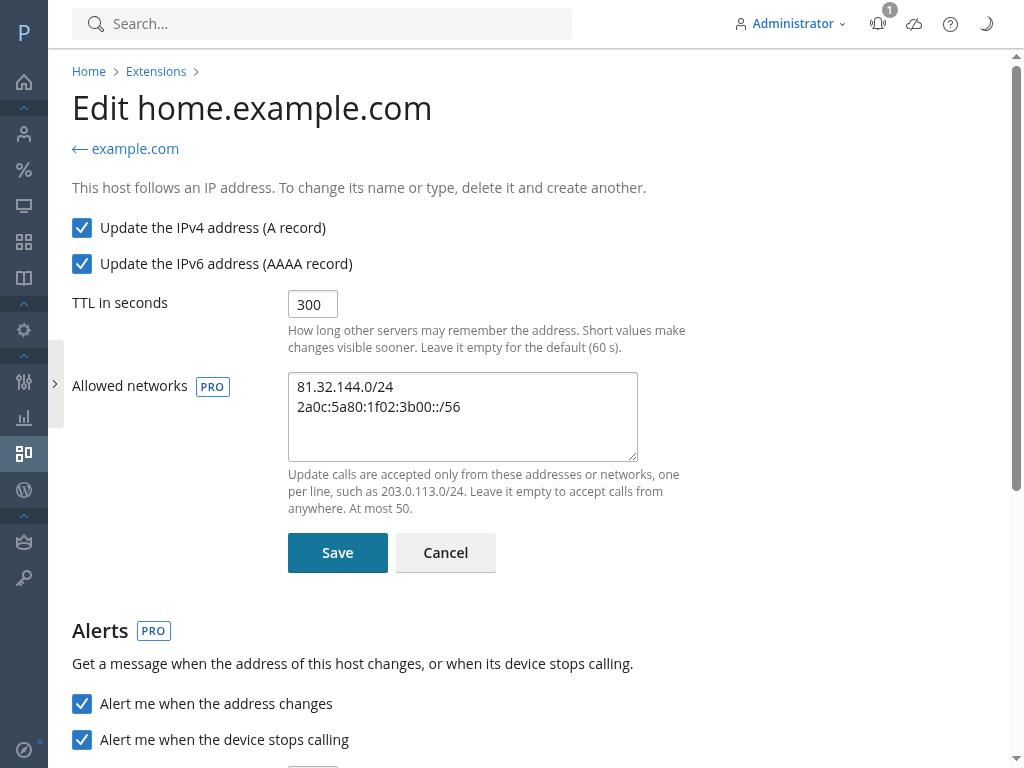
- allowed networks per host: addresses or CIDR ranges (up to 50) the host may be updated
from. Calls from anywhere else get
badauth(dyndns2) or HTTP 403 (JSON API) and are logged; - notifications by webhook and e-mail when the IP address changes, when a host stops calling and when it calls again.
- allowed networks per host: addresses or CIDR ranges (up to 50) the host may be updated
from. Calls from anywhere else get
- Without a valid licence (missing, expired or revoked), the paid copy works as the Free edition: existing hosts keep updating and allowed networks stay enforced, but no more hosts can be created beyond 3, Pro settings cannot be changed and Pro alerts stop being sent.
- If the paid licence has not been valid for 14 days in a row, the daily task downloads the public Free edition and installs it over the paid one, even with the update check turned off. Hosts, log, allowed networks and alert settings are kept; the Pro code is removed. The administrator sees the date from the first day. Paying again: install the paid package from the client area.
Data and privacy
- Everything is stored on the Plesk server, in an SQLite database in the extension's data
directory (
/usr/local/psa/var/modules/dabbleam-ddns/ddns.sqlite). None of it is sent to Dabbleam. The extension only contacts dabbleam.com for three things:- Update check (daily, on by default, can be turned off in About). Free edition: a plain GET of the public release file. Only if the administrator agrees (asked once; Settings > Count this installation), it also sends a random identifier of the installation and the installed version, so Dabbleam can count how many servers use the free edition. Paid edition: a POST with the same data as the licence renewal (below), to check the licence and download the copy with its mark.
- Revoked licences (daily, only with a paid licence; cannot be turned off): a plain GET of the public, signed list of revoked licence files, the same for every server. A yearly licence (one valid for more than 45 days) whose list could not be checked for 30 days stops working until the next check; monthly licences do not need it.
- Licence renewal (on by default, only with a licence and only from 7 days before it expires): a POST with the server's Plesk licence number, the service number and the SHA-256 of the current licence file. Can be turned off in About.
- In all of them, the server's IP address and the user agent
dabbleam-ddnsreach Dabbleam. Dabbleam keeps, per licence, only the date and IP of the last successful check, renewal or update (details in the privacy policy). - Alerts (Pro) go only to the e-mail addresses and webhook URLs each user sets up.
- Per host: domain, name, kind, TTL, key hash and prefix, dates, and the last address that called.
- Activity log: time, host, action, old and new value, the caller's address and user agent, the panel user for changes made in the panel, and the result. Kept for the configured retention.
- Failed calls per source address, for throttling: only the last 10 minutes count, and older entries are purged.
- Uninstalling the extension deletes its data directory. The DNS records stay in their zones as normal records. After reinstalling, creating a host with the same name as one of those records fails with "already has an A record" (or AAAA): delete the old record in the domain's DNS settings first, or keep it and pick another name.
Migrating from plesk-ddns 1.x
dabbleam-ddns replaces Dabbleam's earlier internal extension plesk-ddns 1.x, and is a different
extension for Plesk (a new id). With both installed, import as root:
plesk bin extension --exec dabbleam-ddns import-plesk-ddns.php --dry-run   # report only
plesk bin extension --exec dabbleam-ddns import-plesk-ddns.php
- Each 1.x record becomes a host that adopts the same DNS record and the same key: the zone is
not touched (value, TTL and creation date are kept), and devices keep their key. Only keys with
characters outside
A-Z a-z 0-9 . _ ~ -, or shorter than 8 characters, must be regenerated; the report lists them (with the 1.x defaults, 32 letters and digits, there are none). - The 1.x default TTL and key length are copied if they are not set here yet (the length is clamped to 16-64). The 1.x log is not imported; each imported host gets an "imported" entry in the new log.
- The import only reads
plesk-ddns, which keeps working meanwhile. It can be run again: what is already imported is skipped. Exit code 0 whenever it ran, also when some records need attention (the report lists them; for example, an A and an AAAA record with the same name and different keys, which cannot become one host); 1: it could not run. - The free limit does not stop the import: every imported host keeps updating, but without a license no new hosts can be created while there are 3 or more.
- Then move each device to the new paths (
/modules/dabbleam-ddns/public/...instead of/modules/plesk-ddns/public/...), or have the web server rewrite the old path to the new one; the JSON answers stay compatible. Both extensions can run side by side meanwhile. - Do not uninstall
plesk-ddnsbefore the import: its uninstall script deletes its tables. Uninstall it once every device uses the new paths (that leaves the DNS records in place).
Support
support@dabbleam.com, in English, Spanish, German, French or Italian. Hours, response target and what to include: dabbleam.com/dynamic-dns/support. Never send host keys.
License
Proprietary. © Dabbleam. Use is subject to the end user license agreement.